

Bluetooth Range Headphones: What Actually Extends Wireless Distance
Yes, long-range Bluetooth headphones exist, and the difference comes down to one thing: whether the chipset supports Bluetooth LE Coded PHY, the long-range mode built into the Bluetooth 5 standard. Skip the marketing copy and check the spec sheet for LE long-range support, the codec lineup (LC3, aptX, LDAC), the chipset or SoC named, and any explicit transmit power figure.
Here’s the shortlist to scan before you buy:
- LE Coded PHY support — this is the actual range extender, not the “5.3” badge on the box.
- Named chipset/SoC — vague “Bluetooth 5.3” claims with no chip reference are a red flag.
- Codec support — LC3 and LE Audio matter more for stability than raw version numbers.
- Any stated TX power — most brands don’t list it, but it’s worth asking if it’s not there.
If you need a connection that holds up robustly indoors, prioritize LE long-range support over a headline version number. That’s the rule that actually predicts performance.
Key Takeaways
Bluetooth headphones with genuinely extended range depend on LE Coded PHY support and chipset design, not the version number printed on the box.
| Point | Details |
|---|---|
| LE Coded is the range feature | It uses forward error correction to roughly quadruple range over LE 1M without raising transmit power. |
| Version numbers mislead | A “Bluetooth 5.3” label alone says nothing about range; check for named chipsets and codec support instead. |
| Real-world range is much shorter than spec | Expect around 30 feet indoors through obstructions, with outdoor line-of-sight conditions reaching much farther. |
| Body blocking cuts range fast | Testing phone-in-pocket versus phone-in-hand reveals how much of your range issue is placement, not hardware. |
| Egwat prioritizes stable, long-range-ready designs | Models like the EG 124v5.3 and the Sports Wireless Bluetooth Headset pair Bluetooth 5.3 with antenna and battery choices built for real-world use. |
Table of Contents
- What Bluetooth Version and PHY Really Control
- How Far Do Bluetooth Headphones Actually Reach in Real Life?
- Why Manufacturers Don’t Just Crank Up the Power
- A Checklist for Judging Bluetooth Range Before You Buy
- Matching Form Factor and Features to Your Use Case
- Testing Bluetooth Range Yourself
- Why Egwat Builds for Bluetooth 5 Long-Range Support
- Egwat’s Long-Range Ready Lineup
- Frequently Asked Questions
- Sources
What Bluetooth Version and PHY Really Control
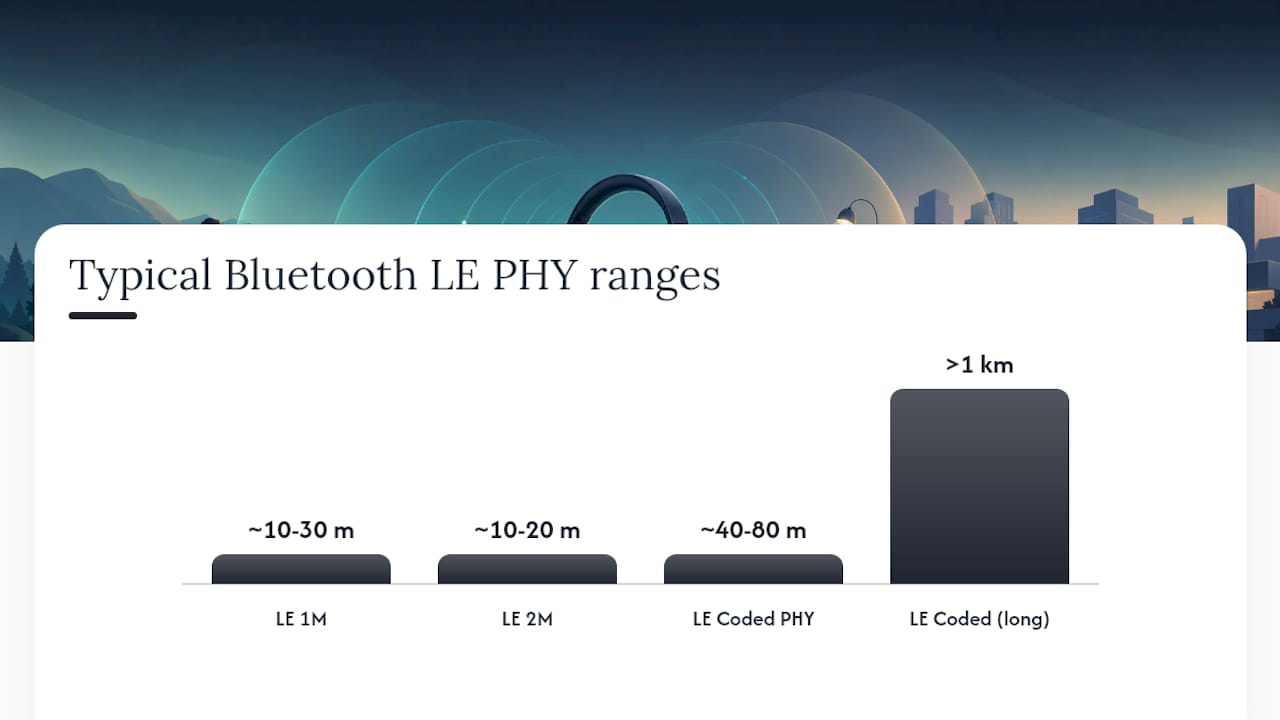
Every Bluetooth radio picks from a small menu of physical layers, or PHYs, and that choice is what decides whether your headphones hold a signal across a room or drop it at ten feet. LE 1M is the baseline PHY most older devices use. LE 2M doubles the data rate for lower latency over short distances. LE Coded is the one that matters for range: it uses forward error correction to let a receiver decode a usable signal even when the raw signal is weak, which roughly quadruples effective range compared to LE 1M without increasing transmit power.
Transmit power and receiver sensitivity set the ceiling underneath all of this. Bluetooth supports transmit power from -20 dBm up to +20 dBm, and typical receiver sensitivity floors sit between -70 dBm and -82 dBm, though some implementations push sensitivity as low as -103 dBm on the 125 kbps LE Coded mode. That’s why effective range varies wildly across devices, from under a meter in a poorly shielded product to over a kilometer in an optimized one.
| PHY | Typical max range (free field) | Data rate | Trade-off |
|---|---|---|---|
| LE 1M | ~10-30 m | 1 Mbps | Standard baseline, shortest range |
| LE 2M | ~10-20 m | 2 Mbps | Faster, lower latency, not built for distance |
| LE Coded PHY | ~40-80 m | 125 kbps LE Coded mode | Moderate range gain, some latency cost |
| LE Coded (125 kbps) | long distances | 125 kbps | Longest range, highest latency, more battery draw |
Bluetooth 5’s other quiet upgrade is CSA#2 (Channel Selection Algorithm #2) paired with advertising extensions, which improve how devices coexist on the crowded 2.4 GHz band and how efficiently they broadcast, without forcing the radio to run at higher peak power.
How Far Do Bluetooth Headphones Actually Reach in Real Life?
Spec sheets describe free-field conditions: open air, clear line of sight, nothing in the way. Your living room is not that. Walls, especially concrete and anything with rebar or metal studs, absorb and reflect 2.4 GHz signals hard. Your own body does the same thing. A phone in your back pocket with your torso between it and your ear can quietly cut range in half.
Add in Wi-Fi routers, microwaves, and neighboring Bluetooth devices all fighting for the same spectrum, and you get the gap between what the box promises and what you experience.
Realistic expectations look like this:
- Indoors, typical apartment or office: moderate indoor range through walls, reduced further through concrete or metal.
- Outdoors, open field, line of sight, LE Coded enabled: can achieve much longer distances under ideal conditions.
- Device placement matters as much as spec: phone on a desk beats phone in a pocket, every time.
- Battery level and antenna integration shift results too. A worn battery can measurably shrink range compared to a fresh one.
Pro Tip: Test your headphones with your phone on a table, Wi-Fi turned off, and no body in between before you test with the phone in your pocket. The gap between those two numbers tells you exactly how much of your “range problem” is actually a body-blocking problem, not a hardware one.
Why Manufacturers Don’t Just Crank Up the Power
Bluetooth engineers describe this as a straightforward trade-off: pushing transmit power higher extends range, but it burns through battery faster and demands more physical space for antenna and thermal design. That’s why a premium pair of over-ear headphones built for 40 or 80 hours of playtime rarely runs at the radio’s maximum output. Engineers are optimizing for the listening session you’ll actually have, not a distance record you’ll rarely need.
Other constraints stack on top of that:
- Antenna placement inside a compact earbud shell is genuinely difficult, and it directly limits achievable range regardless of what the chipset supports.
- RF shielding for ANC circuitry can interfere with antenna performance if the mechanical design isn’t careful about it.
- SoC vendor support matters. Chipsets like the Nordic nRF52 family support LE long-range modes and can offer boosted TX output on select parts, but only when the manufacturer’s firmware actually enables those features.
A Checklist for Judging Bluetooth Range Before You Buy
Run through this before you click “buy,” whether you’re comparing spec sheets online or standing in a store.
- Check the Bluetooth version and look past it. A “5.3” label alone tells you almost nothing. Version numbers are a weak proxy for real-world range or audio quality on their own.
- Look for explicit LE Coded or “long-range” mode support. This is the single strongest signal that a product was engineered for distance, not just marketing.
- Note the codec list. LC3 under LE Audio, aptX, and LDAC all point to a modern, well-supported chipset, and LC3 in particular can deliver comparable quality at lower bitrates, which frees up headroom for stability.
- Find the chipset or SoC name if you can. Product pages that name a specific chip are more trustworthy than ones that just say “Bluetooth 5.3 chip.”
- Treat unverified range claims as marketing until proven otherwise. Ask for third-party test results or measured data, not just a manufacturer’s headline number.
- If a spec is missing, ask. Contact support and ask directly whether LE Audio and LC3 are enabled, what SoC is used, and what the firmware update policy looks like.
Matching Form Factor and Features to Your Use Case
Range needs shift depending on what you’re actually doing. Commuting with your phone jammed in a jacket pocket is the toughest real-world test there is. Expect shorter effective range unless the headphones support LE Coded mode, since body blocking and layered clothing both eat into signal strength.
Office use is more forgiving. Desk-to-desk distance rarely exceeds 20 or 30 feet, so most modern Bluetooth 5 devices handle it without issue. Outdoor use is where long-range PHYs shine, since open air and line of sight remove most of the interference that plagues indoor listening.
Workouts introduce a different problem: constant body movement blocks and unblocks the signal path repeatedly, which is harder on connection stability than distance alone. Over-ear headphones generally have more room for antenna placement than true wireless earbuds, where the antenna competes for space with the battery and driver. If you’re shopping for true wireless earbuds, check whether single-bud multipoint mode is supported, since that can affect how the pair maintains its link. Multipoint connections, low-latency gaming modes, and Auracast readiness (for broadcast listening in public spaces) are worth checking too if those use cases matter to you.
Testing Bluetooth Range Yourself
You don’t need a lab to get a useful read on range. Pick one source device and keep it constant across every test. Turn off Wi-Fi if you want a clean signal reading, then measure indoors and outdoors separately, noting whether you have line of sight or an obstruction like a wall.
- Mark distances in 10 foot increments and walk away from the source device steadily.
- Note exactly where audio starts to stutter or cut out, and repeat the test with your phone in a pocket versus in your hand.
- Record the battery level of both devices, since a low battery can shrink range noticeably.
Keep a simple log of results. It’s useful for your own buying decision, and it’s exactly what a seller will want if you’re disputing a range claim on a return.
Why Egwat Builds for Bluetooth 5 Long-Range Support
Egwat’s engineering priorities start with the trade-off every reader of this article now understands: battery life, antenna integration, and stable connections matter more to everyday listening than a chip that can theoretically hit maximum transmit power. Our premium lines are built around Bluetooth 5.x chipsets chosen for that balance, validated against the same kind of indoor and outdoor testing outlined above. Product pages list the specifics we can confirm, from playtime to connectivity, so you can apply this checklist directly rather than take a version number at face value.
Egwat’s Long-Range Ready Lineup
If you’ve read this far, you already know what to look for: named chipsets, real playtime numbers, and Bluetooth 5.x connectivity that doesn’t buckle the moment you walk to another room. Egwat builds its premium lines around exactly that combination instead of leaning on a version number alone.
The EG 124v5.3 Hybrid ANC Wireless Headphones pair Bluetooth 5.3 connectivity with hybrid active noise cancellation, built for listeners who want a stable link through a commute and a full workday without a recharge. Our broader Hybrid ANC Wireless Headphones flagship line adds long battery runtimes and refined antenna placement inside the ear cups, where there’s actual room to do it right, unlike a compact earbud shell. For workouts and outdoor sessions where body movement constantly interrupts line of sight, the Sports Wireless Bluetooth Headset is built around a form factor that keeps the antenna clear of obstruction better than an in-ear design typically can.
Browse the full headphones collection to compare models against the checklist above, and check specs against your own use case before you buy.
Frequently Asked Questions
Do higher Bluetooth version numbers always mean longer range? No. Version number alone is a poor proxy for range or audio quality. What matters is whether the device’s chipset supports LE Coded PHY and how the manufacturer implemented antenna and power design around it.
How far do Bluetooth headphones reach in real-world conditions? Indoors, expect roughly 30 feet through walls or furniture, less through concrete or metal. Outdoors with a clear line of sight and LE Coded support, range can reach into the dozens of meters and occasionally further.
What’s the single best spec to check for Bluetooth range earbuds? Look for explicit mention of LE Coded or “long-range mode” support and a named chipset. Those two details tell you more than any version number on the box.
Does putting my phone in my pocket really hurt Bluetooth connectivity range? Yes. Your body absorbs 2.4 GHz signal, and a phone in a back pocket with your torso in between the source and your ears can meaningfully shorten effective range compared to holding it in your hand.
Does LE Audio and the LC3 codec affect range? Indirectly. LC3 can deliver comparable audio quality at lower bitrates than older codecs, which frees up bandwidth headroom that can support more stable connections, particularly in crowded RF environments.